




Procedural Facade Windows for 3ds Max LITE
Build facade windows in a few clicks, for free
Open your current facade scene and place the first window in three clicks. VizEasy Procedural Facade Windows Lite is the free version of the PRO script. It does the modeling for you, with up to four segments, tilt, turn or fixed sashes and black or white frames.
To download it, enter your email and first name in the form at the bottom of this page. Confirm your address in the email we send you and you land in the Freebie Vault, where Windows Lite waits next to the other free scripts, presets and 3D assets.
Price: Free
Works with: 3ds Max 2024 or higher
Render engines: V-Ray, Corona
Full version: Procedural Facade Windows PRO
Documentation: PDF guide included
Licence: Free, commercial use allowed
How it works
Click it into place. Create a window with three clicks. You set the width, the depth and the height by clicking, and with snapping on you can click directly on the corners of the opening in the wall.
Then choose the number of segments, the opening mode and the frame color. Repeat it for every opening, or copy a window and change its size.
Fit windows to openings
- Width, depth and height are set precisely, and setback and handle height have their own settings.
- Snapping puts each window exactly on the corners of its opening, and the pivot sits at the lower left corner for easy adjustment.
Edit one window, update them all
- Copy a window as an instance and every instance follows when you edit one of them. Non-instance copies give you variations.
- Each window stays a single object, however many segments it has, so your scene stays free of groups.
Build the window type you need
- Up to four segments, each one fixed or openable.
- Tilt, turn or fixed modes, with control over how far the sash opens. Handle rotation and height can be set, and handles position themselves.
- Flip swing and flip hinge change the opening direction.
- Internal and external glass and window sills can be switched on or off.
- Frames come in black or white.
Lite or PRO?
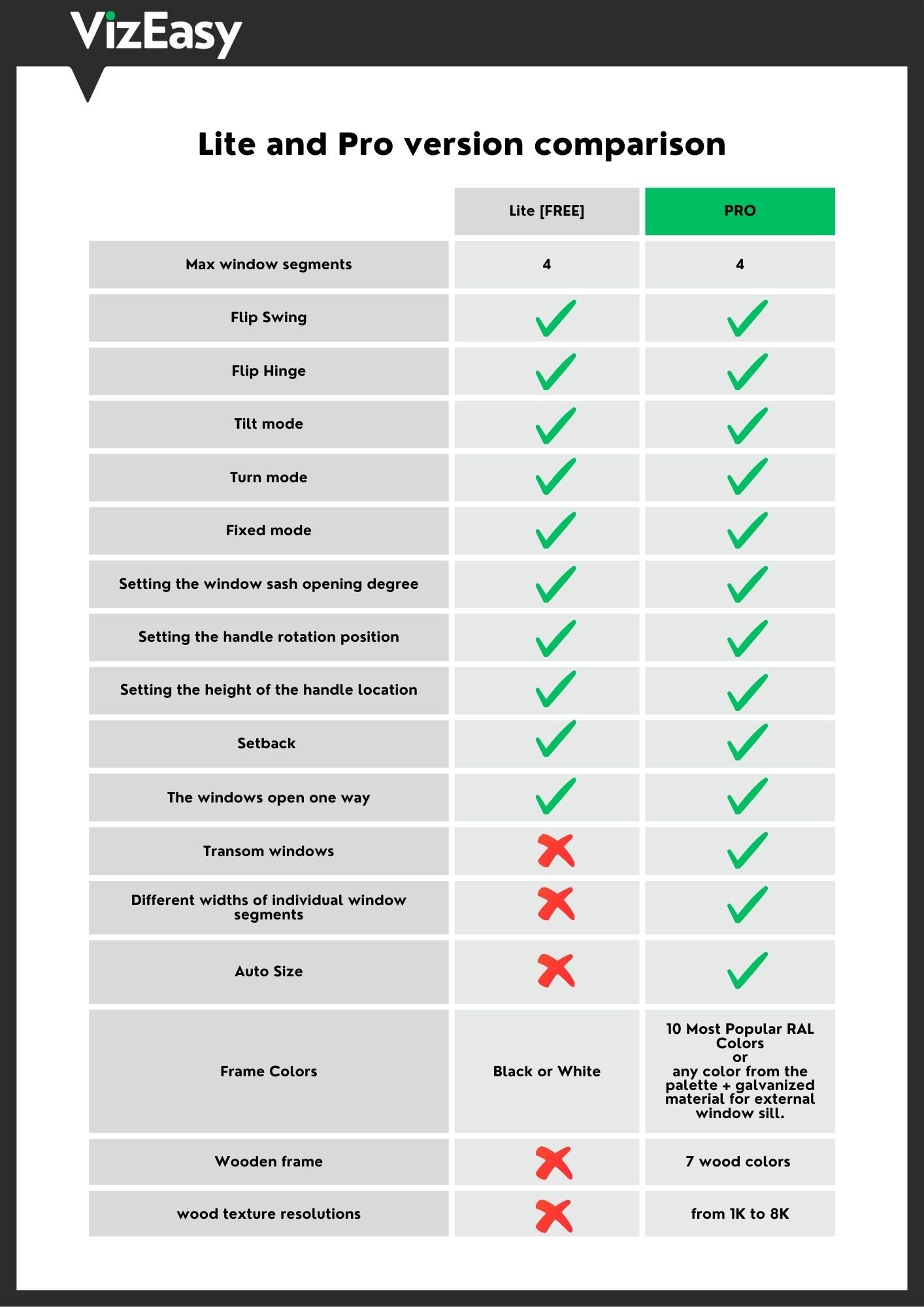
Lite (free): up to four segments, tilt, turn and fixed modes, flip swing and flip hinge, sash opening degree, handle position and height, setback, instances, black or white frames.
PRO adds: Auto Size, individual segment widths, transom windows, 10 popular RAL colors or any color from the palette, 7 wood colors with textures from 1K to 8K, and a galvanized material for external window sills.
See the PRO version in action (2:21)
The video shows the PRO version. Auto Size, transom windows and wood frames appear in it but are not part of Lite.
Details and price: Procedural Facade Windows PRO
Ready to try it?
Enter your email below to download Windows Lite and unlock the Freebie Vault. Need Auto Size, wood frames or more colors later? Upgrade to the PRO version.


